

Digital work instructions: complete guide

Piotr Szeląg

Digital work instructions are electronic, step-by-step guides that replace paper SOPs and work instructions on the shop floor. They help operators perform tasks consistently, capture execution data, and can reduce manual errors by up to 90% in guided manufacturing environments.
In manufacturing, the difference between a good process and a poor one is often not the written procedure itself. It is whether the right person sees the right instruction, in the right version, at the exact point of use. Paper binders, PDFs, printed checklists, and tribal knowledge can work in stable environments, but they become harder to control when products change, variants increase, compliance requirements grow, and new workers need to become productive faster.
Digital work instructions solve that problem by turning static documentation into guided execution. They show operators what to do, how to do it, what to check, what to record, and when to escalate. They can include images, videos, diagrams, forms, 3D models, validation checks, electronic signatures, and real-time updates. They also create a record of what happened: who performed the task, when it was completed, what measurements were entered, and whether any deviation occurred.
This guide explains what digital work instructions are, how they differ from paper instructions and SOPs, which features matter, how they support manufacturing quality, and how to choose digital work instruction software without turning a simple operator guidance project into an oversized systems implementation.
What are digital work instructions?
Digital work instructions are electronic step-by-step guides that show operators, technicians, inspectors, or assembly workers how to complete a task at the point of use.
They are sometimes called electronic work instructions, visual work instructions, digital standard work, or operator guidance. In manufacturing, they are typically delivered on tablets, workstations, HMI screens, mobile devices, or AR headsets. Their purpose is to standardize task execution and reduce variation between operators, shifts, lines, and sites.
A digital work instruction can be as simple as a visual checklist on a tablet. It can also be an interactive guided process that requires the operator to confirm each step, scan a barcode, enter a measurement, attach a photo, or acknowledge a safety warning before continuing.
Typical users include:
- shop floor operators,
- assembly workers,
- maintenance technicians,
- quality inspectors,
- line leaders,
- process engineers,
- training coordinators,
- supervisors.
Digital work instructions are especially useful when tasks are complex, quality-critical, variant-rich, frequently updated, or performed by workers with different experience levels. They help reduce dependence on tribal knowledge by turning the experience of skilled workers into controlled, reusable instructions.
PTC describes augmented reality work instructions as step-by-step instructions that can be authored, edited, published, and scaled for critical workflows, including 3D visual guides overlaid on equipment. Tulip positions digital work instructions as visual, paperless guidance for daily tasks and complex processes, delivered to operators through connected shop-floor applications. Augmentir describes digital work instruction software as a way to improve standardization and quality for inspection, setup, changeover, and maintenance procedures.
Paper vs digital work instructions
Digital work instructions replace the main weaknesses of paper instructions: static content, version risk, missing traceability, and limited ability to guide the operator in real time.
Paper instructions can be familiar and easy to print, but they are difficult to control at scale. Once printed, they can become outdated immediately. Operators may keep local copies, write informal notes, skip steps, or rely on experienced colleagues instead of the official version. For simple, stable tasks, this may be manageable. For regulated, high-mix, or quality-sensitive manufacturing, it creates risk.
Digital work instructions make instructions easier to update, distribute, search, track, and verify.
| Area | Paper work instructions | Digital work instructions |
| Version control | Printed copies can become outdated | Latest approved version can be deployed instantly |
| Format | Mostly text, tables, and static images | Text, images, video, forms, 3D models, AR, interactive steps |
| Tracking | Usually manual or absent | Completion data, timestamps, operator sign-off, deviations |
| Searchability | Physical binders or shared folders | Searchable by product, asset, order, operation, or role |
| Compliance | Requires manual evidence collection | Supports audit trails, electronic records, and acknowledgments |
| Updates | Print, distribute, remove old copies | Update once and publish to all relevant stations |
| Data capture | Separate forms or handwritten notes | Inputs collected inside the instruction flow |
| Training | Dependent on trainer interpretation | Standardized guided execution at point of use |
The practical advantage is not simply “paperless manufacturing.” The advantage is control. A digital instruction can ensure that a worker sees the right revision, follows the required sequence, records required data, and creates evidence of completion.
Paper may describe the standard. Digital work instructions help enforce it.
SOP vs work instruction: key differences
An SOP explains what process should be followed; a work instruction explains how to perform a specific task step by step.
This distinction matters because SOPs and work instructions are often confused. In many companies, the terms are used loosely, which creates documentation that is either too broad for operators or too detailed for management.
A Standard Operating Procedure, or SOP, defines the process-level rule. It usually explains the purpose, scope, responsibilities, process flow, controls, and required records. A work instruction is more granular. It translates part of that SOP into an executable task.
| Dimension | SOP | Work instruction |
| Level | Process level | Task level |
| Main question | What should be done? | How exactly should it be done? |
| Audience | Managers, supervisors, quality, process owners | Operators, technicians, inspectors, assemblers |
| Detail | Broader process and responsibilities | Specific steps, checks, tools, parameters |
| Example | “Perform incoming quality inspection” | “Measure diameter at points A, B, C and enter values into the form” |
| Relationship | Can be decomposed into multiple work instructions | Implements the SOP at task level |
For example, a pharma SOP may define the procedure for line clearance before batch production. The digital work instruction would guide the operator through each action: check previous material removal, inspect tools, confirm label status, scan the order, take a photo, enter the result, and sign electronically.
In this structure, the SOP remains the controlled process document. The digital work instruction becomes the executable shop-floor layer.
Types of digital work instructions
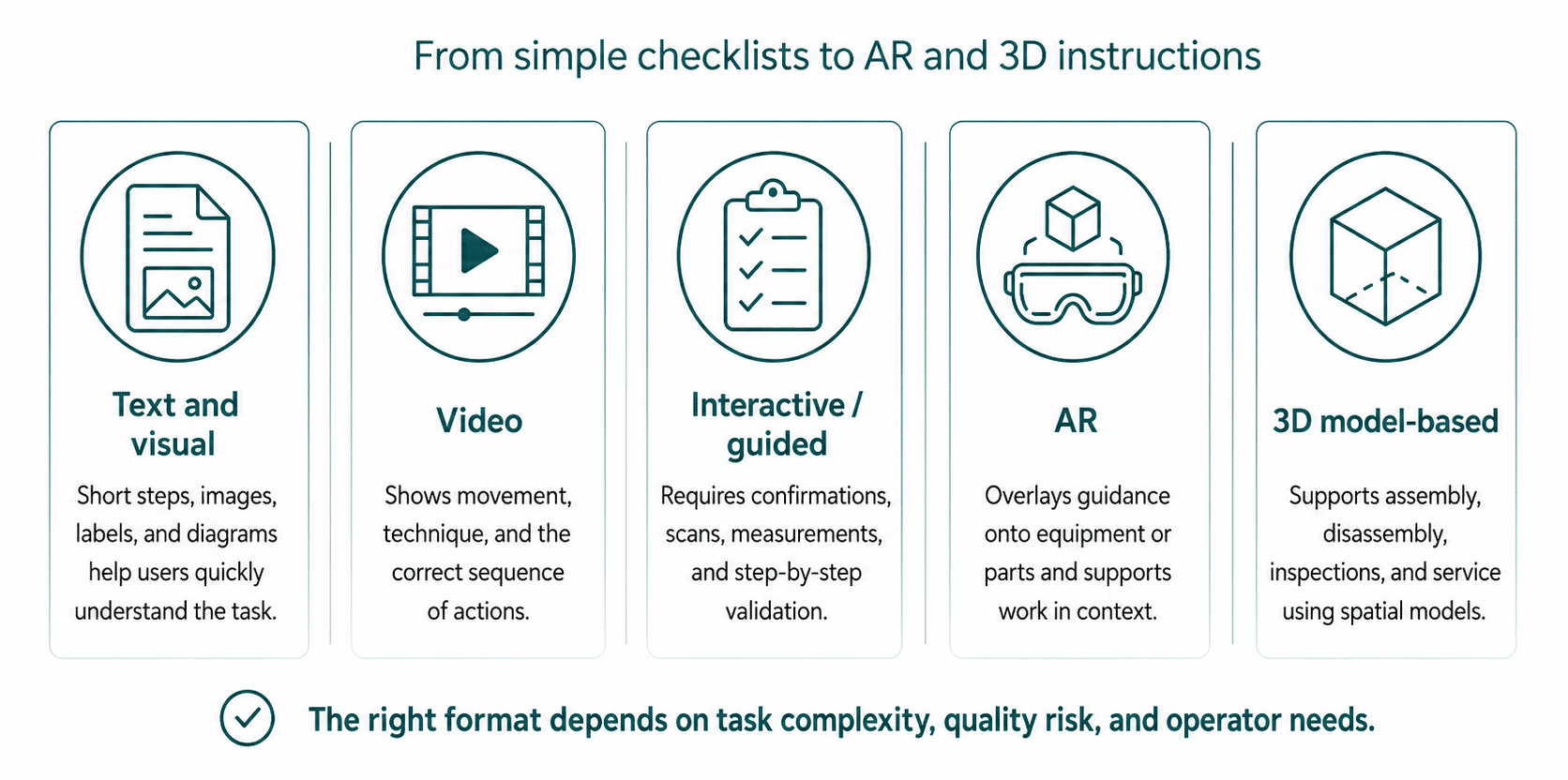
Digital work instructions can be delivered in several formats, from simple electronic checklists to AR-based guidance.
The right format depends on task complexity, operator skill, quality risk, available devices, and the level of interaction required.
Text and image instructions
The simplest format combines short text with annotated images. This is useful for standard assembly, inspection, setup, and maintenance tasks where the operator needs clear visual confirmation but not a full video or AR overlay.
Examples include:
- assembly sequence photos,
- tool position images,
- quality defect examples,
- safety checks,
- product variant selection.
Video work instructions
Video instructions are useful when motion matters. They can show hand placement, tool angle, cleaning technique, inspection method, or correct assembly movement.
They are effective for onboarding, training, and tasks where written instructions are difficult to interpret. However, videos should not become uncontrolled training content. They need revision control just like any other instruction.
Interactive or guided instructions
Interactive digital work instructions require the operator to move step by step through the task. They may include confirmations, required inputs, barcode scans, measurement fields, decision branches, checklists, or warnings.
For example, an operator may not be able to proceed until:
- a serial number is scanned,
- a torque value is entered,
- a photo is attached,
- a measurement falls within tolerance,
- a supervisor approval is recorded.
This is where digital instructions start to support poka-yoke, or error-proofing.
AR-based work instructions
Augmented reality work instructions deliver guidance through AR headsets, tablets, or projection systems. They can overlay instructions, arrows, 3D models, or animations directly onto equipment or parts.
AR is useful when hands-free guidance matters or when spatial context is difficult to explain on a flat screen. PTC Vuforia is one example of an AR-based work instruction platform, and Microsoft HoloLens is a commonly referenced headset category for mixed reality delivery.
3D model-based instructions
3D model-based instructions use CAD or 3D models to show assembly, disassembly, inspection, or maintenance sequences. They are valuable for complex products, service procedures, aerospace, automotive, and equipment manufacturing.
The advantage is visual precision. The challenge is authoring and maintaining the 3D content, especially when engineering changes are frequent.
Key features of digital work instruction software
Digital work instruction software should help teams create, control, deliver, execute, and improve instructions.
The software is not just a document viewer. At minimum, it should manage content, version control, shop-floor delivery, operator interaction, and execution records.
| Feature | What it does | Why it matters |
| Step-by-step guidance | Breaks work into controlled steps | Reduces missed steps and variation |
| Multimedia support | Adds images, videos, diagrams, 3D, AR | Makes tasks easier to understand |
| Version control | Controls revisions and active versions | Prevents outdated instructions on the floor |
| Approval workflow | Routes changes for review and approval | Supports quality and compliance control |
| Operator sign-off | Records acknowledgment or completion | Creates evidence of execution |
| Data capture | Collects checks, measurements, notes, photos | Turns execution into usable data |
| Deviation flags | Allows exceptions or nonconformance reporting | Supports quality response |
| Role-based access | Shows relevant instructions to each user | Reduces confusion and access risk |
| Multi-language support | Delivers instructions in worker language | Supports diverse workforces |
| Integration | Connects with MES, ERP, QMS, CMMS, IoT | Links instructions to orders, assets, quality, and maintenance |
| Search | Finds instructions by product, asset, line, task | Reduces time wasted looking for information |
| Templates | Standardizes authoring format | Speeds creation and improves consistency |
| Analytics | Tracks completion, time, errors, deviations | Supports improvement without replacing analytics platforms |
A mature system should also support reuse. Many instructions share common steps such as safety checks, tool preparation, cleaning, inspection, or sign-off. Reusable content blocks reduce authoring effort and make updates easier.
AI-assisted authoring can help convert existing SOPs, manuals, videos, or expert notes into draft instructions, but AI should remain an authoring aid rather than an uncontrolled publisher. AI for operations is a broader topic and should be covered separately in an AI for operations guide.
Benefits of digital work instructions
Digital work instructions improve consistency, training, traceability, and quality by giving workers current, visual, guided instructions at the point of use.
The benefits depend on task complexity, implementation quality, device availability, and how well the instructions are integrated with shop-floor systems. The strongest results usually appear where manual errors, product variants, training gaps, and compliance records are major operational issues.
| Benefit | How digital work instructions help | Typical metric |
| Error reduction | Guided steps, forced sequence, validation checks | Manual error reduction, defect reduction |
| Faster onboarding | New workers learn while doing with visual guidance | Training time, time-to-competency |
| Standardization | Same approved method across shifts and sites | Process adherence |
| Knowledge retention | Expert know-how becomes documented guidance | Reduced dependence on tribal knowledge |
| Compliance | Electronic records, sign-offs, revision history | Audit readiness |
| Quality improvement | In-process checks and poka-yoke reduce mistakes | First-time-right, defect rate |
| Faster updates | New revisions deployed instantly | Engineering change response time |
| Data capture | Inputs, timestamps, measurements, deviations | Execution visibility |
| Paper reduction | Less printing, storage, manual filing | Paperless manufacturing progress |
Some vendors report large results in guided manufacturing environments. LightGuide states that its digital work instructions help reduce manual errors by 90%+ and improve training efficiency by 70%+ through projected AR guidance, validation, and traceability. PTC Vuforia case material reports that GlobalFoundries accelerated training time by 40% using AR work instructions. L2L reports examples of 50% training-time reduction and 67% product-error reduction in the context of digital work instructions.
These numbers should be treated as reported outcomes, not universal guarantees. A company with poor instructions, many manual steps, and high training variation may see large gains. A highly automated, stable process may see smaller improvements. The value depends on where the errors, delays, and knowledge gaps are today.
Digital work instructions in manufacturing
Digital work instructions for manufacturing help standardize how operators assemble, inspect, set up, maintain, clean, and document shop-floor tasks.
They are commonly used in:
- discrete manufacturing,
- automotive,
- aerospace,
- electronics,
- pharma,
- medical devices,
- food and beverage,
- packaging,
- industrial equipment,
- contract manufacturing.
Assembly
In assembly, digital work instructions guide operators through product-specific steps. They can show images, drawings, torque values, part numbers, barcode scans, and variant-specific branching.
This is especially useful in high-mix manufacturing where operators must switch between variants. The instruction can change based on order, product configuration, serial number, or scanned component.
Quality inspection
For quality inspectors, digital work instructions standardize inspection criteria, measurement points, sampling rules, photo evidence, and defect classification. They can also require inputs before allowing completion.
This supports first-time-right quality and helps reduce subjective interpretation of inspection steps.
Maintenance
Maintenance technicians can use digital work instructions for inspections, lubrication, calibration, troubleshooting, changeovers, and repair procedures. Instructions can include photos, safety steps, lockout checks, tool lists, and required measurements.
Predictive maintenance is a separate topic, but maintenance instructions can be triggered by maintenance alerts or work orders generated by a CMMS. For the broader maintenance strategy, see the predictive maintenance guide.
Setup and changeover
Setup and changeover work instructions help reduce variation between operators. They can include target settings, tool lists, cleaning requirements, validation checks, and line clearance steps.
In regulated or high-variant environments, this is one of the highest-value applications because setup errors can create defects, downtime, or compliance deviations.
Training and onboarding
Digital instructions help new workers become productive faster by embedding task knowledge into the work process. Instead of relying only on classroom training or shadowing experienced workers, new employees can follow guided instructions directly at the workstation.
This does not remove the need for training. It changes training from memory-based learning to guided performance at the point of use.
Poka-yoke and error-proofing through digital instructions
Digital work instructions implement poka-yoke by guiding workers through the correct sequence and preventing common mistakes before they happen.
Poka-yoke means mistake-proofing. In digital work instructions, it can be implemented through:
- forced sequence,
- barcode verification,
- required measurement fields,
- tolerance checks,
- visual confirmation,
- sensor-triggered gates,
- mandatory photos,
- electronic sign-off,
- automatic product-variant selection,
- warning prompts before critical steps.
For example, an operator assembling a product variant may be required to scan the component before installation. If the scanned part does not match the order, the instruction blocks the next step. In another case, a torque value may need to be entered before the operator can continue. If the value is outside tolerance, the system flags a deviation.
This is different from simply telling people to be careful. The process itself makes the wrong action harder or impossible.
Digital work instructions can improve production quality through error-proofing, but a full discussion of production performance belongs in a dedicated manufacturing performance guide.
Compliance and audit trail
Digital work instructions support compliance by creating controlled records of who did what, when, using which instruction version, and with what result.
This is especially important in regulated industries such as pharmaceuticals, medical devices, food and beverage, aerospace, and automotive.
Key compliance features include:
- revision history,
- approval workflows,
- electronic signatures,
- operator acknowledgment,
- training records,
- timestamped execution records,
- deviation documentation,
- attachment of evidence,
- access control,
- change history.
In life sciences, FDA 21 CFR Part 11 is a key reference for electronic records and electronic signatures. FDA guidance explains that Part 11 applies to electronic records and electronic signatures under Title 21 of the Code of Federal Regulations. Tulip notes that 21 CFR Part 11 is relevant for medical device and pharmaceutical manufacturers using electronic records and electronic signatures.
Other relevant frameworks include ISO 9001 for quality management, IATF 16949 for automotive quality management, and GMP requirements in pharmaceutical and food-related environments.
A digital work instruction system does not automatically make a process compliant. It provides technical capabilities that can support compliance when combined with validated procedures, controlled access, training, review, and quality governance.
Digital work instructions and connected worker platforms
A connected worker platform is a broader system that delivers digital instructions, training, communication, collaboration, performance tracking, and frontline data capture.
Digital work instructions are often one core module of a connected worker platform. Other modules may include:
- skills matrix,
- training management,
- issue escalation,
- shift handover,
- communication,
- performance tracking,
- digital checklists,
- forms,
- audits,
- maintenance procedures.
Tulip positions its platform around no-code shop-floor applications and connected workflows, including digital work instructions. Augmentir describes its connected worker solution as enabling companies to digitize work instructions, checklists, and SOPs while integrating frontline workers into the digital thread.
The distinction matters. If the goal is simply to digitize a few instructions, a focused work instruction tool may be enough. If the goal is to connect training, execution, communication, quality, and analytics, a connected worker platform may be more appropriate.
For a broader view of how worker knowledge, procedures, and operational content are managed, see the knowledge platform guide.
Data capture from digital work instructions
Digital work instructions capture execution data that paper cannot collect reliably.
Common data points include:
- operator ID,
- workstation,
- instruction version,
- start and completion time,
- step duration,
- confirmation status,
- measurement values,
- pass/fail checks,
- barcode scans,
- photos,
- comments,
- deviations,
- rework actions,
- supervisor approvals.
This data can feed MES, QMS, analytics tools, or production records. For example, quality measurements collected during assembly may be sent to a QMS. Completion data may be linked to an MES order. Maintenance checklist results may update a CMMS. Instruction execution trends may be analyzed later to identify steps that cause frequent delays or errors.
Manufacturing analytics can consume completion data from digital work instructions, but analytics methods should be developed in a separate manufacturing analytics guide.
The data layer also creates a feedback loop. If one step consistently takes longer than expected, fails more often, or causes deviations, process engineers can revise the instruction, adjust tooling, change training, or redesign the process.
Integrations: MES, ERP, QMS, CMMS, and IoT
Digital work instructions become more useful when integrated with the systems that define products, orders, quality requirements, assets, and maintenance tasks.
Typical integration points include:
| System | Integration purpose |
| MES | production orders, operations, routing, status, execution records |
| ERP | product master data, BOM, work orders, inventory context |
| QMS | quality checks, nonconformance, CAPA, audit evidence |
| CMMS | maintenance work orders, asset history, inspection tasks |
| IoT sensors | measurement validation, tool status, sensor-triggered gates |
| HMI / SCADA | machine state, process confirmation, alarms |
| PLM | product revisions, engineering changes, CAD or 3D content |
For example, an ERP or MES may define which product variant is being built. The instruction system displays the correct variant-specific steps. A barcode scan validates the component. A torque tool sends the actual torque value. The QMS receives the inspection record. The MES receives completion status.
This is where digital work instructions connect with an industrial data platform, but the full architecture of data integration belongs in that dedicated topic.
How to create digital work instructions
Creating digital work instructions is not just copying a paper document into a tablet. The goal is to make the task executable, clear, and measurable.
Step 1: Select the right process
Start with a process where instructions matter. Good candidates include:
- recurring quality issues,
- high training burden,
- frequent changeovers,
- high product variation,
- regulated operations,
- complex assembly,
- maintenance inspections,
- tasks dependent on tribal knowledge.
Avoid starting with the most complex process in the plant. A strong pilot should be important enough to matter but narrow enough to complete.
Step 2: Observe the real work
Do not write instructions only from existing SOPs. Watch experienced workers perform the task. Identify informal decisions, shortcuts, checks, tool choices, and common mistakes.
This is where tribal knowledge is captured. The purpose is not to document every personal habit, but to separate useful expert knowledge from uncontrolled variation.
Step 3: Break the task into steps
Each step should be clear, short, and action-oriented. A good step usually answers:
- what to do,
- where to do it,
- what tool or part to use,
- what value or condition is acceptable,
- what to record,
- what to do if something is wrong.
Step 4: Add visual guidance
Use images, videos, diagrams, markings, screenshots, or 3D views where they reduce ambiguity. Visual guidance should clarify the task, not decorate the page.
Good visuals show:
- correct part orientation,
- tool position,
- acceptable vs unacceptable results,
- measurement location,
- safety risk,
- sequence of actions.
Step 5: Add checks and validations
Decide where the instruction should require confirmation, data entry, scan validation, measurement input, or supervisor approval. Use these gates where they reduce risk, not on every trivial step.
Step 6: Define ownership and approval
Every instruction needs an owner. Define who can edit, approve, publish, archive, and review instructions. Without ownership, digital instructions can become outdated just like paper documents.
Step 7: Test on the shop floor
Run the instruction with real users, at the workstation, during real or simulated production. Check whether the instruction is understandable, practical, and not disruptive.
Step 8: Publish, train, and monitor
After approval, publish the instruction to the relevant devices and users. Monitor completion time, deviations, questions, and operator feedback. The first version should not be treated as final.
Process optimization can use digital work instructions for standardization, but detailed optimization methods should remain in a dedicated process optimization guide.
Choosing digital work instruction software
Digital work instruction software should be evaluated by how well it supports authoring, execution, control, integration, and improvement.
A practical selection checklist includes:
| Evaluation area | Questions to ask |
| Authoring | Can engineers create instructions without coding? |
| Templates | Are there reusable templates for assembly, inspection, maintenance, and setup? |
| Multimedia | Can users add images, videos, PDFs, 3D models, AR, and annotations? |
| Version control | Can the system manage revisions, approvals, and active versions? |
| Execution | Can operators follow steps, enter data, scan codes, and sign off? |
| Devices | Does it work on tablets, workstations, HMI screens, mobile devices, and AR headsets? |
| Integrations | Can it integrate with MES, ERP, QMS, CMMS, IoT, and identity systems? |
| Compliance | Does it support audit trails, electronic signatures, and controlled access? |
| Analytics | Can it report completion times, deviations, errors, and process bottlenecks? |
| Usability | Can shop-floor users operate it easily under real working conditions? |
| Scalability | Can it support multiple lines, plants, languages, and product variants? |
No-code or low-code authoring is important because process engineers, quality engineers, trainers, and supervisors often own the content. If every change requires software development, instructions will not stay current.
Vendor landscape 2026
The digital work instructions market includes AR platforms, connected worker platforms, visual instruction tools, no-code manufacturing apps, and industrial data platforms. The list below is neutral and informational, not a ranking.
| Vendor / product | Positioning | Typical role |
| PTC Vuforia | AR-based work instructions and expert capture | AR and mixed reality guidance for complex procedures |
| Tulip | No-code connected worker and frontline operations platform | Digital instructions, apps, data capture, shop-floor workflows |
| Augmentir | AI-powered connected worker platform | Digital instructions, worker guidance, skills, performance insights |
| Poka | Digital work instruction software for manufacturing | Frontline knowledge, instructions, and communication |
| Dirac Inc | Digital work instruction explanation and solution provider | DWI education and implementation support |
| Veryable | Digital work instruction tool comparisons and workforce operations content | Market education and tool selection context |
| VKS | Visual Knowledge Share work instruction software | Visual work instructions, traceability, shop-floor documentation |
| PicoMES | Manufacturing work instruction and error-proofing software | Guided execution and poka-yoke for production tasks |
| Smart RDM | Industrial Data & AI Platform | Industrial data, knowledge, analytics, and operational decision support |
When comparing vendors, the key question is not only “can it display instructions?” but “can it keep instructions current, guide the operator, capture data, support compliance, and integrate with the systems that run the factory?”
Implementation best practices
Digital work instructions should be implemented as an operational change, not just a documentation migration.
A practical rollout follows this sequence:
author → approve → deploy → execute → capture data → improve
Start with a pilot
Choose one process, one line, or one workstation. Select a use case where the current instruction process causes measurable pain: defects, training time, missed steps, deviations, or frequent questions.
Involve operators early
Operators know where the existing instructions are unclear or unrealistic. Involving them early improves adoption and helps identify steps that look correct on paper but fail in practice.
Keep instructions short and visual
Long digital instructions can be just as ineffective as long paper instructions. Each step should be direct, visual, and focused on the action.
Control versions from the beginning
Define revision ownership, approval flow, and publishing rules before scaling. Do not allow uncontrolled edits on the shop floor unless the process is designed for controlled feedback.
Connect to quality and maintenance workflows
If a deviation occurs, the worker should know what to do next. Should they stop the process, call quality, create a nonconformance, request supervisor approval, or continue with a note? Digital work instructions should make escalation clear.
Measure adoption and outcomes
Track usage, completion rates, step duration, deviations, training time, and defect rates. These metrics show whether the instructions are improving work or simply replacing paper.
Scale by templates
Once the pilot works, create standard templates for common instruction types: assembly, inspection, maintenance, setup, changeover, cleaning, line clearance, and audit checks.
Common mistakes to avoid
Digital work instruction projects often fail when they digitize documents without redesigning them for execution.
Copying paper into a screen
A 20-page PDF on a tablet is not a digital work instruction. It is a digital document. A true DWI is structured into steps, visuals, checks, and data capture.
Too much detail
Operators need the right level of detail. Too little creates ambiguity. Too much slows the task and encourages skipping.
No ownership
If no one owns the instruction after launch, it will become outdated. Every instruction should have a process owner, review cycle, and approval path.
Weak change management
Workers may resist new tools if they see them as surveillance or extra administrative work. Explain the purpose, simplify the interface, and show how the instruction prevents mistakes.
No integration
If the instruction does not know the product, order, asset, or quality requirement, operators may still need to search elsewhere. Integration is not required for every pilot, but it matters at scale.
Ignoring shop-floor conditions
A tablet may not work well with gloves, dust, water, bright light, or limited space. Device choice must reflect the real environment.
Digital work instructions examples
Assembly example
An operator assembling an electronics module receives step-by-step guidance on a workstation screen. The instruction shows component orientation, requires a barcode scan, confirms the correct variant, displays torque values, and records completion time.
Quality inspection example
A quality inspector follows a digital inspection checklist. The system shows where to measure, requires entry of measurement values, flags out-of-tolerance results, and attaches photos of defects to the quality record.
Maintenance example
A technician follows a preventive maintenance instruction on a tablet. The instruction lists lockout steps, safety checks, lubrication points, measurement fields, and required sign-off.
Changeover example
A packaging line operator follows a changeover guide. The instruction shows tool changes, format settings, cleaning checks, and startup validation before production resumes.
Pharma line clearance example
An operator completes a line clearance instruction with electronic signature, photo evidence, batch reference, revision-controlled checklist, and deviation documentation if a previous product label is found.
FAQ
What are digital work instructions?
Digital work instructions are electronic step-by-step guides that help operators, technicians, inspectors, and assembly workers perform tasks correctly at the point of use. They replace paper instructions with interactive, visual, and trackable guidance.
What are electronic work instructions?
Electronic work instructions are digital versions of task-level instructions delivered through screens, tablets, mobile devices, workstations, or AR systems. They may include images, videos, confirmations, data entry, and sign-off.
What is the difference between SOP and work instruction?
An SOP defines what process should be followed at a broader level. A work instruction explains how to perform a specific task step by step. SOPs are process-level documents; work instructions are task-level execution guides.
What is an example of a digital work instruction?
An example is an assembly instruction on a tablet that shows each step, displays images, requires barcode scanning, collects torque values, records operator sign-off, and blocks progress if a required check fails.
What software can create work instructions?
Work instruction software can include no-code connected worker platforms, visual work instruction tools, AR instruction platforms, MES modules, and industrial knowledge platforms. Examples include PTC Vuforia, Tulip, Augmentir, Poka, VKS, PicoMES, and Smart RDM.
What are visual work instructions?
Visual work instructions use images, diagrams, videos, annotations, or 3D models to explain how a task should be performed. They are useful when text alone is not enough to show correct execution.
What are augmented reality work instructions?
Augmented reality work instructions overlay digital guidance onto equipment, parts, or the worker’s field of view. They can support hands-free execution, spatial guidance, remote expert support, and complex service or assembly tasks.
How do digital work instructions reduce errors?
They reduce errors by standardizing steps, showing visual guidance, enforcing sequence, requiring validation, collecting measurements, and preventing operators from skipping critical checks.
How do digital work instructions help training?
They shorten training by embedding guidance into the task itself. New workers can learn while doing, with visual support and controlled steps, instead of relying only on classroom training or tribal knowledge.
Are digital work instructions only for manufacturing?
No. They are used in manufacturing, maintenance, field service, logistics, laboratories, quality inspection, and regulated operations. Manufacturing is one of the strongest use cases because task consistency directly affects quality and productivity.
Can digital work instructions support compliance?
Yes. They can support compliance through version control, electronic signatures, audit trails, training records, operator acknowledgment, timestamped execution records, and deviation documentation.
Can digital work instructions integrate with MES or ERP?
Yes. Digital work instructions can integrate with MES, ERP, QMS, CMMS, IoT sensors, HMI screens, and other systems to display the right instruction for the right product, order, asset, or operation.
What are digital work instructions for manufacturing?
Digital work instructions for manufacturing are shop-floor guides that standardize assembly, inspection, setup, changeover, maintenance, cleaning, and quality tasks. They help workers perform tasks consistently and record execution data.
How do you create digital work instructions?
Start with a high-value process, observe real work, capture expert knowledge, break the task into steps, add visuals, define checks, assign ownership, test on the shop floor, publish the instruction, and improve it using operator feedback and execution data.
What is a connected worker platform?
A connected worker platform is a broader system that may include digital instructions, training, communication, issue escalation, performance tracking, skills management, and frontline data capture. Digital work instructions are often a core module of such platforms.
Conclusion
Digital work instructions turn static documentation into guided shop-floor execution. They help workers follow the right steps, use the right version, record required data, and respond correctly when something goes wrong.
Their value is practical: fewer errors, faster onboarding, stronger standardization, better knowledge retention, and clearer evidence for compliance. The strongest results appear when digital instructions are not treated as PDFs on a screen, but as an execution layer connected to operators, machines, products, quality records, and maintenance tasks.
For manufacturers, digital work instructions are often one of the most direct ways to improve standard work. They capture tribal knowledge, guide workers at the point of use, support poka-yoke, and create data that can feed quality, production, maintenance, and knowledge systems. In that sense, they are not only a documentation tool. They are a bridge between operational knowledge and digital execution.


Light mode